
pplies To: Enterprise Administrators, Site Managers, Mobile Users
Table of Contents
- Overview: What are Inspections and Why Use Them?
- Accessing Manage Inspections
- Inspections Page
- FAQs
- Related Articles
Overview: What Are Inspections and Why Use Them?
Inspections are task lists users complete for work orders. Field engineers primarily perform them via the Transcendent Mobile App, though managers and administrators can also complete specific inspections through the Transcendent web portal.
Inspections are crucial for most Preventative Maintenance (PM) and Round Activities, while Special Inspections (SIs) often handle administrative tasks like uploading documents. You can create inspections with just a single question or expand them to over 200 questions (Room PMs could be 200+ questions long!), utilizing up to 13 different question types currently supported by Transcendent.
Value of Inspections:
- Ensure equipment is maintained properly with the right questions.
- Ensure life/water safety standards are followed to corporate standards.
- Customizable in a variety of ways
Accessing Manage Inspections
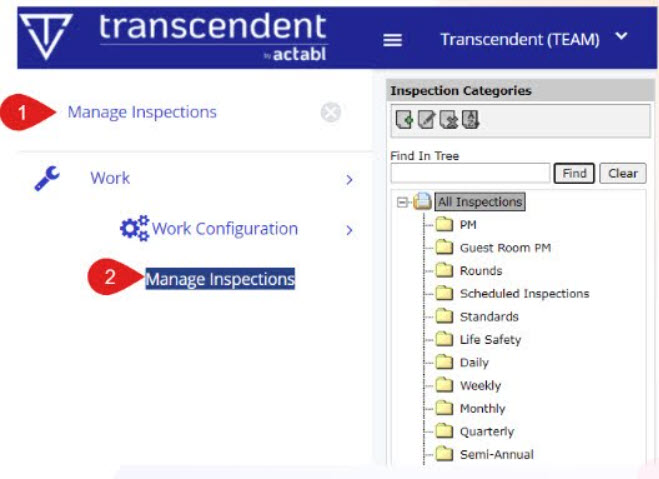
You can easily access the Inspection Management page within the system by
following these steps:
- Search for "Manage Inspections" in the Search field.
- Click the "Manage Inspections" option.
Inspections Page
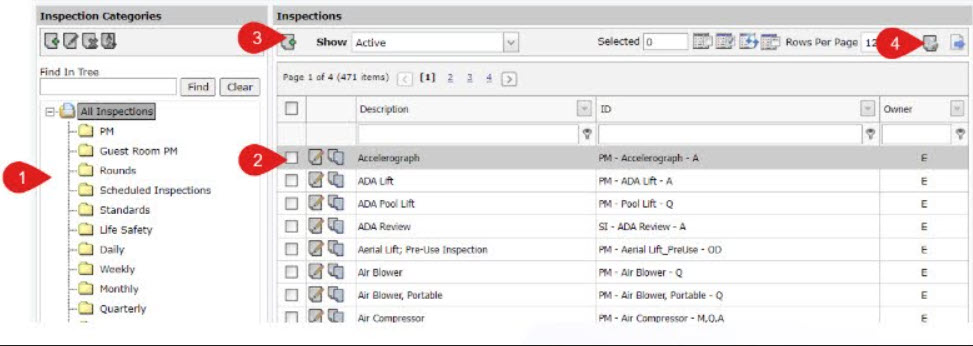
The Inspections page provides a centralized view for managing all inspections, featuring categories for organization and a grid to view individual inspection details. From here, you can also create new inspections or export reports.
- Inspection Categories: A simple categorization tree that organizes types of inspections. These can include special rules, like flagging a PM as "RM" type if it's in the "Guest Room PM" category.
-
Inspection Grid: Each record represents a single inspection. It displays the Description and ID, as well as who owns the inspection.
- Site-owned inspections are ONLY available at that local site, while Enterprise-owned inspections are available for all sites.
- Click Edit to manage the setup and configuration of that inspection.
- Add New Inspection: This allows you to create a brand new inspection (much more details to follow).
-
Report Export: Generate a report of all the questions and answers for any inspection(s) currently selected.
FAQs
Q: Who uses inspections?
A: Enterprise Administrators, Site Managers, and Mobile Users all utilize inspections.
Q: Can inspections be performed on a computer or only mobile?
A: Most inspections are performed via the Transcendent Mobile App by field engineers, but managers and administrators can complete some via the Transcendent web portal (Like SIs).
Comments
0 comments
Article is closed for comments.